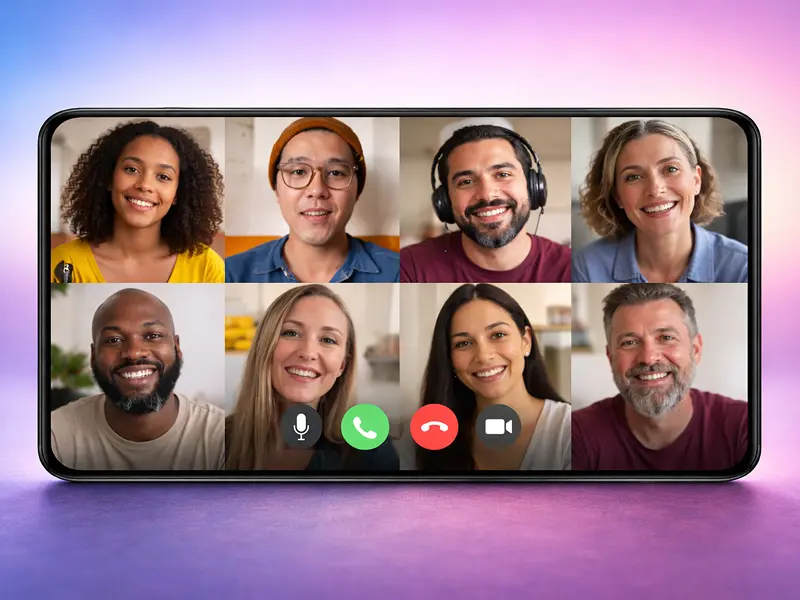
How many times have you joined a group call and had no idea what was going on?
You click “Join,” see 15 tiny faces on your phone screen, and spend the first ten minutes asking, “Wait, who is talking?” and “What is the agenda again?”
It’s a productivity killer.
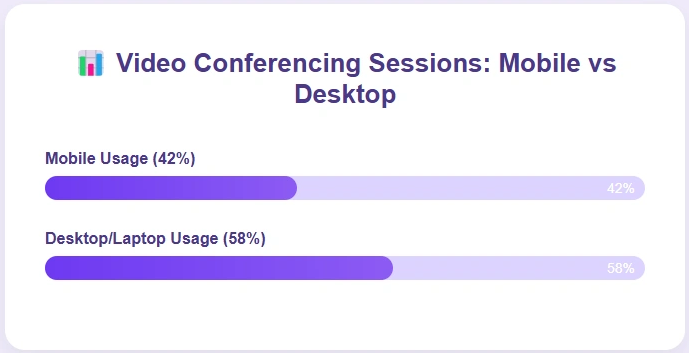
Mobile usage now accounts for over 42% of all video conferencing sessions.
But here is the problem: most apps weren’t designed for the “mobile-first” group experience. They were ported over from desktop, and it shows.
If you want to run a successful group call from your phone, you need an app that handles the crowd without the chaos.
Let’s walk you through some of the best apps for large group video calls on mobile.
1. FaceCall
FaceCall is the #1 pick because it solves the biggest issue with large group calls: Anonymity.
On a typical mobile app, when 10+ people join, it’s a mess. FaceCall uses its signature Video Caller ID to fix this. Before you enter a group session, you see a 5-second video “intro” from the host or participants.
It gives you the “Why” of the meeting before you even say hello.
But for large groups, the real win is the mobile-native architecture. FaceCall is built specifically for Android and iOS, meaning it doesn’t drain your battery or lag when 20 people are on the screen.
It also requires a secure phone number registration, so you know that you’re always getting a call from somebody who has your number.
If you want to run a group call that actually feels organized and professional on a 6-inch screen, this is it.
- Contextual Group Intros: See a quick video summary of the meeting’s purpose before you join the room.
- Real-Time Group Translation: Perfect for international teams; everyone hears the conversation in their own language.
- Low-Latency Mobile HD: Engineered to keep video smooth even on 5G or spotty Wi-Fi connections.
The Bottom Line: If you’re tired of “blind” group calls on your phone, FaceCall is the only app providing the context you need to stay productive.
2. Zoom
We all know Zoom. It’s the juggernaut for a reason.
If you need to fit 100+ people into a single mobile call, Zoom is usually the first name on the list.
Their mobile app has come a long way, offering features like virtual backgrounds and “Safe Driving Mode” which is a huge plus for people on the move.
However, Zoom’s biggest weakness on mobile is complexity.
There are so many buttons and settings that it’s easy to feel overwhelmed. Also, without a feature like FaceCall’s Video Caller ID, you’re still clicking a “mystery link” and hoping the meeting is actually worth your time.
- Massive Capacity: Supports up to 1,000 participants (on paid plans) directly from your mobile device.
- Mobile Breakout Rooms: One of the few apps that lets you manage small group sessions from a smartphone.
- AI Meeting Companion: Automatically generates a summary of the group chat so you don’t have to take notes while on the move.
- Screen Sharing Excellence: One of the most stable mobile screen-sharing experiences in the industry.
3. Microsoft Teams
If your whole company is already on Office 365, Teams is your default.
For large groups, Teams is great because it integrates your files and your chat history right into the call.
If someone mentions a spreadsheet in a group call of 50 people, you can pull it up on your phone instantly.
But here is the catch: Teams is heavy.
It is a resource-hungry app that can make your phone run hot during long group sessions. It also lacks the “Visual Intent” layer that FaceCall provides, often leading to “Calendar Fatigue” – where you’re just hopping from one link to the next without a clear focus.
- Infinite Conversation History: The group chat lives on long after the video call ends.
- Deep Integration: Access Word, Excel, and PowerPoint files without ever leaving the video interface.
- Background Blur & Noise Suppression: Industry-leading tech to make sure your 50-person meeting doesn’t hear the coffee shop noise behind you.
- Enterprise Security: Meets every compliance standard imaginable for high-security industries.
4. WhatsApp
WhatsApp is the king of convenience. With over 2 billion users, everyone already has it.
They recently bumped their group video call limit to 32 people, which is more than enough for most family reunions or small team huddles. It’s fast, it’s simple, and it just works.
Even though WhatsApp is good for large group calls, it kind of defeats the purpose of the app too.
The app is primarily a personal communication app.
Plus, it provides zero context. When a group call rings, you see a list of names and that’s it. You don’t know the agenda, you don’t know the mood, and you don’t know the “Why.” For a professional or high-stakes group, it feels a bit too “personal.”
- Zero Learning Curve: Everyone on your team already knows how to use it.
- End-to-End Encryption: Your group secrets are safe between you and the participants.
- Low Data Mode: Designed to work in parts of the world where the internet is less than perfect.
- Call Links: You can now create a link and send it to a group, making it easier to join “on the fly.”
5. Google Meet
Google Meet is preferred for its simplicity.
If you have a Gmail account, you’re ready to go. On mobile, it’s remarkably lightweight.
For large groups (up to 100 on the free tier), it offers a clean grid view that doesn’t feel cluttered.
The downside? It can feel a bit “sterile.”
It doesn’t have the personality or the proactive “intro” features that FaceCall uses to build trust.
It’s a great utility, but it isn’t a “connection” tool. You’re just a tile in a box.
- No-Download Joining: People can join your group call via a link in their mobile browser if they don’t have the app.
- Google Calendar Sync: Your group calls are automatically scheduled and pushed to everyone’s mobile notifications.
- Live Sharing: Watch YouTube videos or listen to music together during the call (great for “social” group calls).
- Hand Raise Feature: Essential for managing large groups to make sure everyone gets a chance to speak.
6. Telegram
If you are a tech-forward group, Telegram is a beast.
It supports group video calls for up to 1,000 viewers (with 30 people broadcasting).
It is incredibly fast, and the UI is slick. For “Watch Parties” or massive “Town Hall” style calls on mobile, Telegram is a strong contender.
But at the same time, Telegram requires you to be proactive about security.
You have to ensure you’re using their secure calling features, or your data might be stored on their servers.
It’s a power user’s tool, but it might be too complex for a standard business team.
- Massive Viewer Capacity: Great for broadcasting a mobile video to a huge audience.
- Noise Suppression Toggle: You can manually control how much background noise the app filters out.
- High-Res Media Sharing: Send files up to 2GB while you’re on the call.
- Customizable Interface: Change the look and feel of your group call UI to match your brand or mood.
Which Video Calling App Should Your Group Use?
Here is the truth: Most groups are suffering from “Meeting Fatigue.”
If you want to kill the chaos of large group calls and give your team the context they need to stay focused, you have to try FaceCall.
It’s the only app that uses Video Caller ID to make sure everyone knows the “Why” before they hit “Join.”
Stop wasting time in mystery meetings.
Download FaceCall and start running group calls with clarity and intent.