
Remote work has a “context” problem that is costing companies more than they realize. In a physical office, you can see if a colleague is deep in a spreadsheet or wearing noise-canceling headphones before you tap them on the shoulder.
Digitally? You’re flying blind.
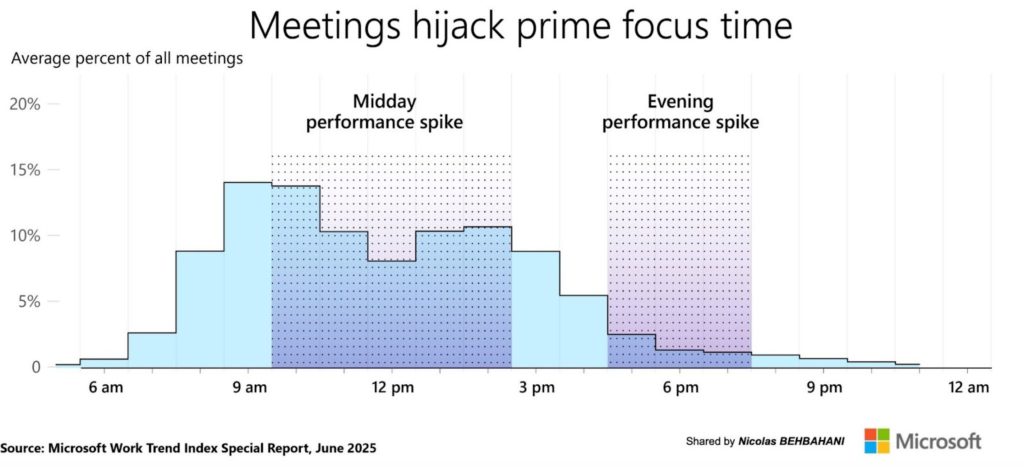
The average knowledge worker is interrupted every 40 seconds by an app switch or notification. More importantly, 82% of employees report attending meetings that “could have been an email,” largely because the purpose of the call wasn’t clear from the start.
When a remote team lacks context, “call anxiety” spikes. You see a ringing phone and think: Is this an emergency, or a quick question?
This uncertainty triggers a cognitive tax that costs the global economy an estimated $450 billion annually in lost productivity.
We’ve compared the six biggest players to see which ones solve this friction – and which ones just add more noise.
1. FaceCall
FaceCall isn’t just another video app; it’s a “focus engine.”
While every other app on this list tells you who is calling, FaceCall is the only one that tells you why – before you ever pick up.
In a remote team setting, this is the missing link. Imagine a developer in a “flow state.” Instead of a generic ringing phone interrupting their logic, they see a 5-second Video Caller ID from their PM saying, “Quick question on the API docs”
The developer can then prioritize that call without breaking their mental model.
By leading with the Video Caller ID, FaceCall solves the “Do you have a sec?” dilemma that kills productivity. It allows for a high-trust, high-transparency environment where every call has a clear intent.
- The Video Caller ID: This is the “Visual Why.” It allows callers to record a brief snippet that plays on the recipient’s screen, providing instant context before the call is answered.
- Live Translation for Global Syncs: It bridges the gap between offshore and onshore talent instantly during live video, making it a powerhouse for distributed international teams.
- Mobile-Native Performance: Optimized specifically for Android and iOS to handle high-definition video without the battery drain common in desktop-first ports.
2. Zoom
Zoom remains the “standard” choice for large-scale webinars, but it struggles with the spontaneity of remote work. It is designed for the calendar, not for the conversation.
While Zoom has added AI summaries, it still suffers from “meeting bloat.”
Data shows that meeting frequency has risen 153% since 2020, and Zoom’s link-heavy culture is a major contributor.
For a remote team, a Zoom call is a formal event, which often feels too heavy for a quick 2-minute sync. You’re forced to create a “room” just to ask a simple question.
- Robust Breakout Rooms: Still the gold standard for large workshops and “All Hands” meetings.
- Extensive App Ecosystem: Integrates with almost everything from Jira to Salesforce for data-heavy teams.
- High-Fidelity Recording: Excellent cloud storage and transcriptions for compliance-heavy industries.
3. Microsoft Teams
If your company “lives” in Excel and PowerPoint, Teams is your inevitable home. It’s less of an app and more of an operating system for work.
However, “Teams Fatigue” is a documented phenomenon.
Knowledge workers now handle an average of 153 messages per day on Teams. Because it’s so integrated, the boundaries between “chat,” “file sharing,” and “calling” blur.
This makes it difficult to find a quiet moment for deep work because the app assumes that if you are “Online,” you are “Available” for any type of interruption.
- Native O365 Integration: Unbeatable for teams that need to co-edit documents live during a call.
- Persistent Conversation History: Keeps the chat context linked directly to the video meeting for later review.
- Granular Admin Controls: Offers the enterprise-grade encryption and permissions required by massive corporations.
4. Google Meet
Meet is the choice for teams that hate “joining” processes. If you have a browser and a calendar invite, you’re in. It’s lightweight and reliable for basic communication.
The downside? It’s almost too simple. In a comparison of features, Meet often feels like it’s playing catch-up. For remote teams, the lack of an integrated “Why” behind the call means you’re still stuck in a cycle of reactive answering. It lacks the professional “edge” that helps a team prioritize their most urgent tasks.
- Live AI Captions: Powered by Google’s industry-leading speech-to-text AI for better accessibility.
- Browser-First Architecture: No software to download on desktop, though the mobile app is required for Android/iOS users.
- Seamless Workspace Sync: Automatically generates links for every single Google Calendar invite.
5. Slack Huddles
Slack Huddles tried to solve the “formality” problem by making calls feel like a quick chat. They are great for small, “unplanned” sessions between two or three people.
But Huddles have a “noise” problem.
Because they are so easy to start, they can become a source of constant interruption. Since 2024, 68% of people have reported that frequent communication means they don’t have enough uninterrupted focus time.
Huddles are a major culprit because, like most on this list, you still don’t know the intent until you click “Join.”
- One-Click Connectivity: Start a call within any channel or DM without generating a link.
- Collaborative Screen Drawing: Multiple users can annotate the same shared screen—a favorite for design teams.
- Non-Intrusive UI: The interface is minimal, allowing you to keep your workspace visible during the call.
6. WhatsApp
Many small, global teams default to WhatsApp because everyone already has it. It’s great for a 1-on-1, but it’s a productivity nightmare for professional teams.
The biggest issue here is the “Context Zero” experience. A WhatsApp call is just a ringing phone.
Much like TrueCaller, there is no professional Video Caller ID to tell you if it’s a client emergency or a colleague asking about a lunch order. Furthermore, mixing your personal “Family Group” with your “Work Chat” is a proven recipe for employee burnout and boundary blurring.
- Global Ubiquity: Nearly everyone with a smartphone has it, making it easy to reach external contractors.
- End-to-End Encryption: Highly secure for private, sensitive conversations.
- Low-Bandwidth Optimization: Designed to work in regions with slower internet connections.
The Insight: Why the “Who” Isn’t Enough
In the current remote landscape, knowing who is calling is only 50% of the equation. The other 50% (the part that saves your sanity) is the intent.
When you use an app like FaceCall, you are reclaiming your time.
By forcing a moment of “context” through a Video Caller ID, you eliminate the 23 minutes it typically takes a human to refocus after a “pointless” interruption.
For remote teams, that isn’t just a feature—it’s a survival strategy for your focus.
Stop flying blind. Eliminate the “call anxiety” that slows your team down and start leading with context.Download FaceCall for Android or iOS today and experience the power of Video Caller ID. Start telling your team the “Why” before the “Hello.”